Business Process Automation & Workflow Optimisation
Turning repetitive admin into connected, automated workflows.
The challenge
Most businesses don't have one enormous process that's obviously broken. They have hundreds of tiny inefficiencies quietly bleeding time every week.
Someone receives an email. They copy information into a spreadsheet. Another person updates an internal system. A document gets saved into the wrong folder. Someone sends a Teams message. Another person creates a task. Then three days later somebody asks: 'Has anyone actually dealt with this?'
Individually, these tasks take minutes. Multiply them across a team, every day, every week, and those minutes become hours of repetitive work.
The objective was to examine existing business processes and use tools already available within the organisation, including the Microsoft 365 ecosystem and other internal software, to connect systems, automate repetitive actions and make everyday workflows more efficient.
Our approach
We didn't start by throwing new software at the problem. We started by understanding how the work actually moved through the business.
Where does information enter? Who needs it? Where is it manually copied? What triggers the next action? Where do delays happen? Which tasks are repeated every time? And which steps genuinely require a person to make a decision?
Once the process was mapped, we could separate work that needs human judgement from work software can handle automatically. From there, existing Microsoft tools and internal systems could be connected into more efficient workflows.
The objective was simple: enter information once. Let it move automatically wherever possible.
The business already had powerful software. The problem was that much of it was operating in isolation. Outlook. Teams. SharePoint. Excel. Forms. Internal business systems. People were acting as the bridge between them.
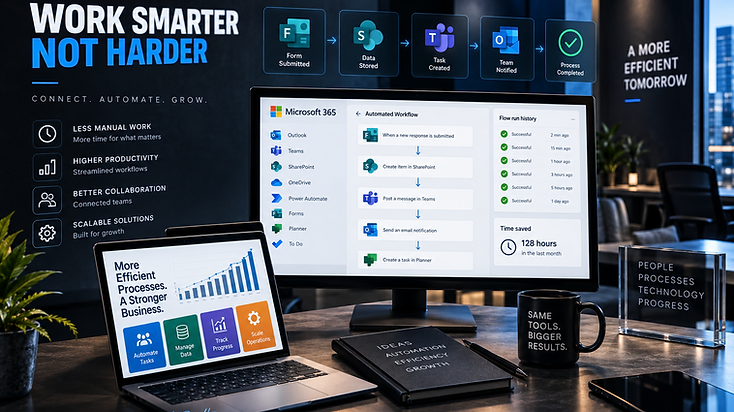
We redesigned workflows so the software could start doing more of that work itself. For example: Form Submitted → Information Captured → Relevant Records Updated → Document Created or Stored → Task Assigned → Team Member Notified → Approval Requested → Status Updated. Instead of somebody manually pushing information through every stage, the workflow keeps moving automatically.
The biggest opportunities often came from small tasks happening at high frequency. Copying information between systems. Creating the same folders. Sending standard notifications. Updating spreadsheets. Moving documents. Creating tasks. Chasing approvals. Sending confirmation emails. Updating statuses.
None of these jobs are particularly difficult. That's exactly why people shouldn't be wasting hours doing them manually. Where the rules were predictable, automation could take over.
For businesses already operating inside Microsoft 365, there is often considerably more capability available than they're actually using. Power Automate can connect actions across different systems. SharePoint can create structured information and document environments. Teams can become part of automated communication workflows. Forms can capture information directly into business processes. Outlook can trigger actions rather than simply receiving another email somebody has to deal with. Excel can feed or receive information without endless copying and pasting.
The goal wasn't to introduce technology for the sake of it. It was to make the technology the business already depended on work harder.
Not every process lives inside Microsoft. Where appropriate, other internal platforms and business systems were considered as part of the wider workflow. The question remained the same: can these systems talk to each other? Where integrations, APIs or compatible automation tools were available, information could move between platforms without requiring somebody to manually recreate the same data in multiple places.
That reduces duplicated work and helps create a cleaner flow of information throughout the business.
What we delivered
- Business Process Review
- Workflow Mapping
- Microsoft 365 Optimisation
- Power Automate Workflows
- Microsoft Teams Integration
- SharePoint Workflows
- Microsoft Forms
- Excel Process Automation
- Outlook Automation
- Automated Notifications
- Approval Workflows
- Document Management
- Task Creation & Assignment
- Internal Software Integration
- Data Transfer Automation
- Reporting Workflows
- Process Documentation
- Ongoing Workflow Optimisation
The result
The finished workflows created a more connected internal operation with fewer repetitive manual steps.
Information could move faster. Tasks could be created automatically. Teams could receive notifications at the right moment. Documents could be stored consistently. Approvals could follow defined processes. Data could move between systems with less human intervention. And employees could spend less time acting as the middleman between pieces of software.
The value isn't one dramatic button that suddenly transforms the company. It's getting back five minutes here, ten minutes there, twenty minutes somewhere else, then multiplying those savings across hundreds or thousands of processes over the course of a year. That's where automation starts becoming commercially powerful.
Built for more than launch day
Automation shouldn't force a company to completely change the way it operates just to accommodate the technology. The technology should support the process.
Workflows can continue to evolve as the organisation changes, new systems are introduced and further repetitive tasks are identified. One process gets automated. Then another. Then another. Slowly, the friction starts disappearing.
Less clicking. Less copying. Less chasing. More getting done.
Want to turn repetitive admin into automated workflows?
Start a projectLet's build something that grows.
Tell us about your business, your problem or your idea. We'll work out the smartest way to get you there.